







Papi
Batch PDF Processor for macOS
Papi is a native Mac app for PDF editing and processing. Drop in a PDF, drag pages into the order you want, build a pipeline of operations, watch a live preview update as you work, then export a clean new file — in one click, without touching the original.
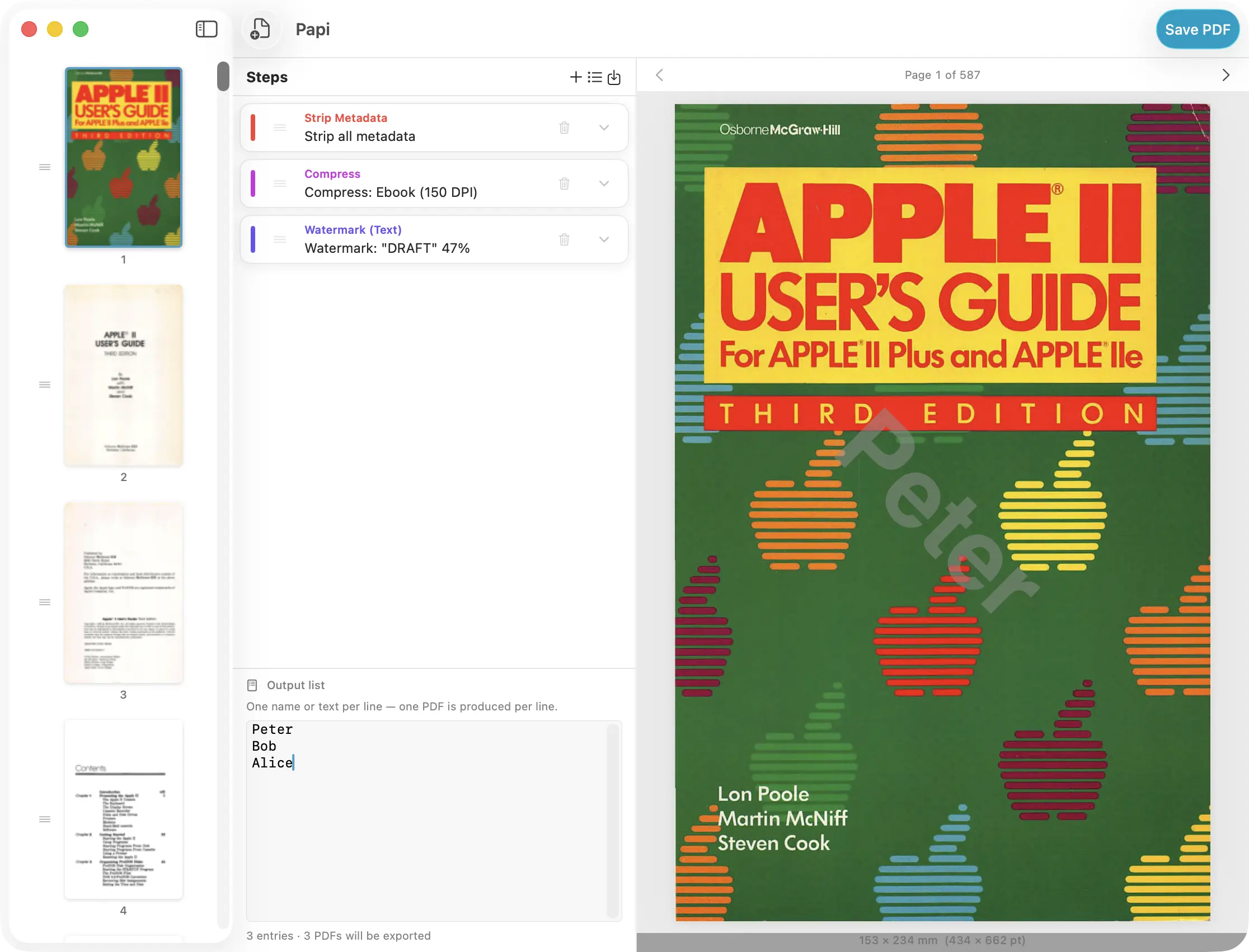
Built for Real Workflows
Lawyers assembling exhibit packets in the right order. Designers stripping metadata and compressing assets before client delivery. Admins stamping every page of a report with a watermark and page numbers in one step. Anyone who has ever opened Adobe Acrobat, balked at the price, and settled for Preview’s limited tools. Papi handles all of it — without a subscription, without a cloud upload, without a command line.
Fourteen Rules. One Pipeline.
Add as many rules as you need, in any order. Papi applies them in sequence to your document before writing the output.
Page Manipulation
- Rotate Pages — rotate all pages or a specific range by 90°, 180°, or 270°
- Crop Margins — trim unwanted whitespace or borders from every page
- Extract Pages — keep only the pages you want; discard the rest in the output
- Delete Pages — remove specific pages from the output while keeping the rest
Annotation
- Add Page Numbers — stamp numbers at any corner or centre position, with configurable font, size, colour, and start value
- Stamp Header — overlay a custom text line at the top of every page
- Stamp Footer — overlay a custom text line at the bottom of every page
- Watermark (Text) — diagonal or positioned text overlay at configurable opacity, font, and colour
- Watermark (Image) — overlay a logo or graphic at configurable scale and opacity
Metadata
- Set Metadata — write a new title, author, subject, and keywords into the document
- Strip Metadata — remove all embedded metadata in a single step before sharing
Output
- Compress — choose from Screen (smallest), Ebook, Printer, or Prepress (highest fidelity); a live size estimate shows the expected reduction before you export
- Flatten — merge interactive form fields and annotations into static page content
- Protect — set an owner password to lock the output PDF against further editing
Live Page Preview — Always Watching
A full-size page preview sits at the centre of the window and updates every time you change a rule. Rotate a page — see it flip. Add a watermark — watch it appear. Delete a range — the page count updates immediately. The one exception is compression, which happens at write time: for that rule, Papi shows an estimated file size reduction badge directly below the preview — so you still know what to expect before you click Export.
Drag Your Pages Into Order
The left panel shows every page as a draggable thumbnail. Drag to reorder — the sequence you set is the sequence written to the output. Visual indicators keep you oriented at all times: pages targeted by a Delete rule show a red overlay and a trash badge; pages outside an Extract range are dimmed; pages targeted by a Rotate rule display a direction arrow. You always know what the output will look like before you export a single byte.
Built-In Presets
Papi ships with presets for the most common jobs: compress for web, strip metadata before sharing, stamp with page numbers, archive-quality output, and more. Load one to start immediately, or save any rule stack you build as your own named preset for instant reuse on future documents.
Non-Destructive by Design
Papi never modifies your original file. Every export reads from the source and writes a new file at the destination you choose. Your original stays exactly as it was — always.
Native and Private
Papi is a native Mac app built in SwiftUI. All processing happens on your Mac using Apple’s own PDFKit and Quartz frameworks — no cloud uploads, no account, no subscription required. Your documents never leave your machine.
Privacy
Papi collects no data and contains no telemetry of any kind. Read the full privacy policy. · Help & User Guide